
Frequently asked questions
Questions about courses, equipment, plans, and billing? Start here. You can try a free course, then choose a paid plan if you want more coursework or support. Browse the courses or compare the plans.
Where should I start?
- New to PCB design? Try Getting to Blinky 5.0. The introductory lesson is a place to see the teaching style before choosing a paid plan. This course uses KiCad 5-era material; check the course page for the version and equipment it expects.
- Want a shorter practical skill? Browse soldering, test equipment, or revision control. Check each course page for prerequisites and access.
- Already design boards? Current Sink Or Swim covers a constant-current load; Advanced BLE-CELL follows a more complex four-layer cellular/Bluetooth board. Difficulty ratings on the course library help you choose.
Course overviews are public. Individual lessons may require a free login or a paid plan; the plan required depends on the lesson. The course library is self-directed rather than a fixed cohort schedule.
What does a course look like?
A project can take you from a schematic and board layout through manufacturing, assembly, measurements, and troubleshooting. For example, Getting to Blinky 5.0 walks through a small 555-timer blinking board and lists its lesson sequence. The Advanced BLE-CELL overview links its actual Rev A schematic and shows photos of the board. Those are examples of course work, not promises that every course supplies the same files or a finished kit.
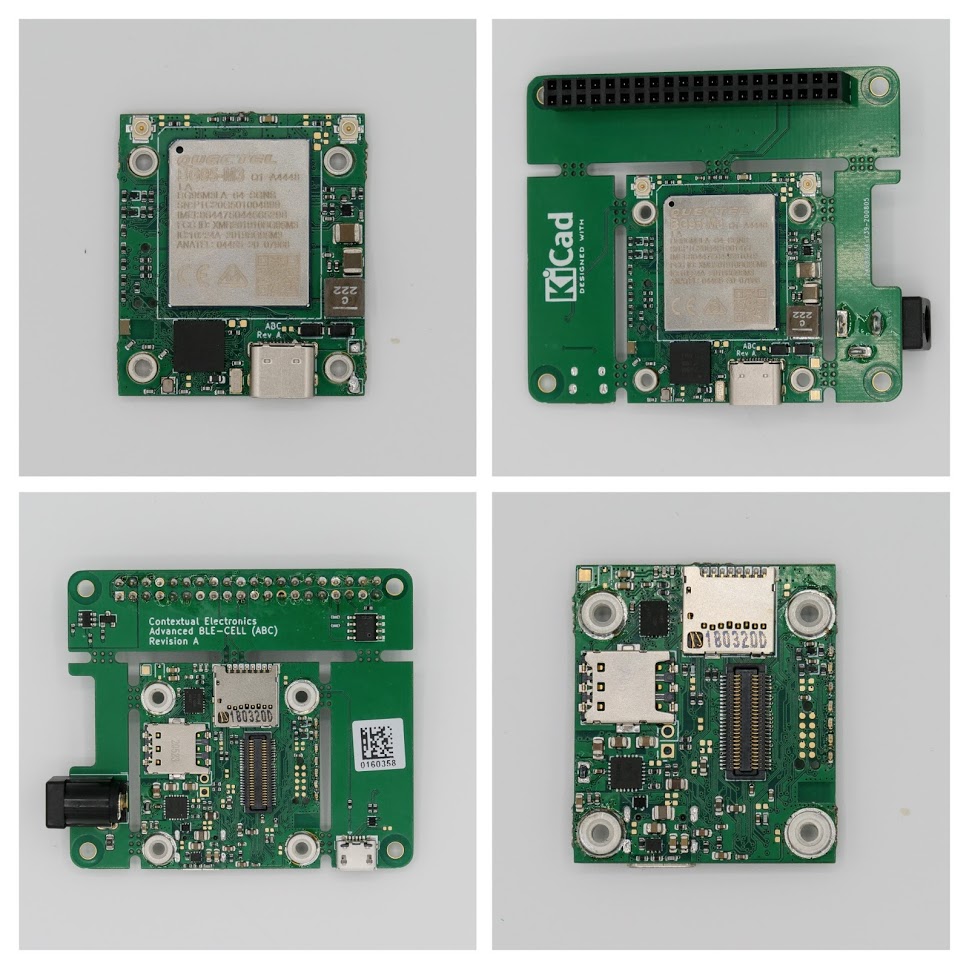
An assembled board from the Advanced BLE-CELL course (2020). This is a course project, not a member testimonial or a kit included with membership.
You can follow design decisions without fabricating every board. If you want hands-on assembly and testing, expect to source parts and use your own bench equipment; course pages give the project-specific requirements. We don't include fabrication, parts, or tools in the subscription price.
Which plan should I choose?
| Plan | Listed monthly price | Current checkout description |
|---|---|---|
| Free | $0 | Free courses |
| Skills | $9 | Free and skills courses; group forum support |
| Apprenticeship | $59 | Free, skills, and design courses; group and private forum support |
These are the plans featured on the site. The billing provider may show additional options; check the pricing page at checkout for current prices and terms. Another learning option is coming soon, but its details are not available yet. The Book Community is a separate preview offering.
What tools and parts do I need?
The subscription covers access, not a parts kit. A computer and the relevant software are enough to follow many design lessons; building along may require PCBs, components, soldering tools, a power supply, and measurement equipment. Costs vary by project and what you already own. Read a course's prerequisites and parts notes before ordering anything. Getting to Blinky 5.0, for example, calls for KiCad and soldering equipment.
Support and billing
What support comes with each plan?
- Skills: group forum support.
- Apprenticeship: group and private forum support.
The plan descriptions do not promise a number of individual design reviews or a response time. If you need a particular kind of help, ask us before choosing a plan.
Can I try a course before paying?
Yes. Browse public overviews and sign up for the Free plan on the pricing page to access free courses. Getting to Blinky 5.0 is a practical starting point. Some lessons require a login even when the course overview is public.
Is there a required order or schedule?
No fixed order is required. The library has difficulty ratings and individual course prerequisites. Start with an introductory project or choose a skill relevant to the board on your bench.
Can I get feedback on my own board?
You can ask for help through the support channels listed above. A guaranteed one-to-one or pre-fabrication board review is not specified in the plan descriptions. Contact us with your project if that is what you need.
How does billing and cancellation work?
Paid plans are displayed as monthly subscriptions on the pricing page. Check the billing terms and cancellation controls shown during checkout. If you need to know exactly when access ends after cancellation, or whether progress and downloads remain available, contact us before subscribing; those details are not stated in the current checkout descriptions.
Is there a trial or refund guarantee?
Don't rely on older promotions or coupon pages when choosing a plan. The pricing page is the current checkout. If a trial, discount, or refund policy affects your decision, ask us for the current terms before paying.
Do I need to buy the hardware?
No kit is bundled with these plans. You can learn by watching the process; to reproduce a build, budget separately for the tools, components, and fabrication described in that course.
Have another question? Get in touch or compare plans.